The ABR Ladder Lie: You're Encoding Renditions Your Viewers Will Never Touch
Photo: video streaming quality settings analytics dashboard on computer screen, via as2.ftcdn.net
Let's talk about the ABR ladder — specifically, the unexamined assumption that more rungs equals better streaming. It's one of those ideas that sounds obviously correct until you actually look at the data, at which point it starts to fall apart pretty quickly.
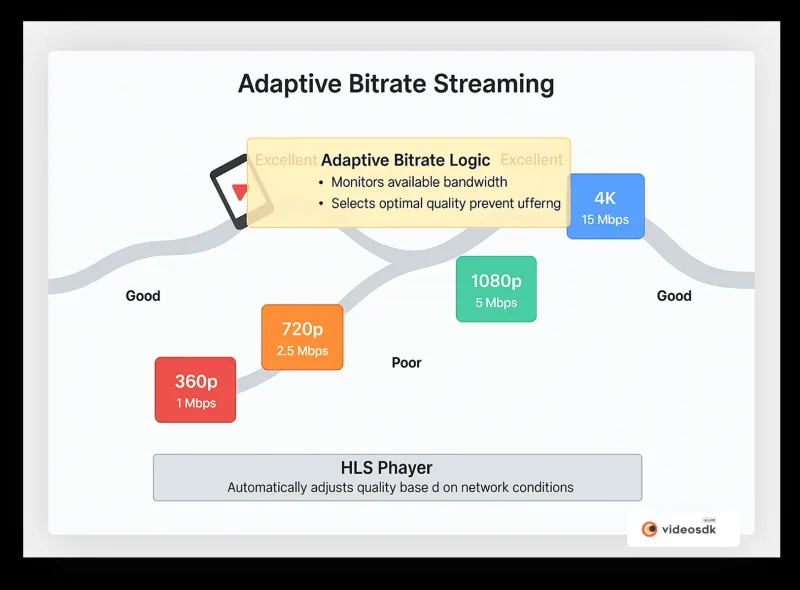
The conventional wisdom goes something like this: encode a wide range of quality levels, from a low-bandwidth mobile option up through 1080p or 4K, and your adaptive bitrate player will seamlessly serve the right one to every viewer based on their connection. Simple. Elegant. Bulletproof.
Except for the part where you're probably encoding four or five renditions that almost nobody ever watches. That part's less elegant.
Where the Myth Comes From
The multi-rendition ABR model isn't wrong — it's just been applied without enough nuance for too long. When HLS and DASH became the dominant delivery formats, the guidance around ladder design was largely theoretical. Encode a broad range, cover all the bases, let the player sort it out.
That guidance made sense when we didn't have good data on how viewers actually behave. We do now. And what the data shows is that viewer distribution across renditions is almost never uniform — it's heavily clustered, usually around two or three quality tiers, with the outlier renditions getting a tiny fraction of total delivery.
A study of viewer behavior across mid-sized streaming platforms consistently shows that the lowest-bandwidth rendition (typically 240p or 360p at sub-500 Kbps) accounts for less than three percent of total playback minutes on most services. Meanwhile, the 720p and 1080p tiers handle the overwhelming majority of delivery.
You're encoding for the three percent. And you're paying for it every single time.
What Your CDN Logs Are Actually Telling You
This is the part where we get practical. If you haven't pulled a rendition request distribution report from your CDN in the last 90 days, go do that before you read another word. Seriously. The numbers are almost always surprising.
What you're looking for is the percentage of total requests — and total delivery bytes — served from each rendition in your ladder. Not theoretical usage. Actual delivery.
For most platforms serving a US audience, the pattern looks something like this:
- 1080p (4–6 Mbps): 35–50% of delivery
- 720p (2–3 Mbps): 25–35% of delivery
- 480p (1–1.5 Mbps): 10–15% of delivery
- 360p (600–800 Kbps): 5–8% of delivery
- 240p (200–400 Kbps): 1–4% of delivery
- Additional intermediate renditions: distributed across remaining percentage
If you're running a six- or eight-rung ladder, the bottom two or three rungs are probably handling less than 10 percent of your total delivery combined. You're encoding, storing, and maintaining those renditions for a fraction of your audience — and in many cases, that fraction is made up of viewers on constrained connections who may churn regardless of how many low-quality options you give them.
The "More Is Safer" Fallacy
Here's why teams resist trimming their ladders even after they see the data: it feels risky. Removing a rendition feels like you're abandoning a segment of your audience. What if someone on a slow connection can't play your stream because you removed the 240p option?
This is a real concern, but it's being applied too broadly. The question isn't whether you should have a low-bandwidth option — you probably should, especially if mobile viewership is significant for your platform. The question is whether you need four low-bandwidth options clustered between 200 Kbps and 800 Kbps.
Most ladders have redundancy in exactly the wrong places. They over-index on the low end where viewers are rare and under-differentiate in the mid-to-high range where the majority of your audience actually lives.
Building a Leaner Ladder That Actually Serves Your Audience
The framework for optimizing your rendition set starts with your own audience data, not an industry template. Here's a practical approach:
Step 1: Segment your viewers by connection profile. Your analytics platform should give you a rough breakdown of viewer connection speeds or at least device categories. Mobile viewers on cellular connections behave differently from living-room CTV viewers on home broadband. Know your mix.
Step 2: Map rendition requests to delivery percentage over 90 days. This is your utilization baseline. Any rendition delivering less than five percent of your total bytes is a candidate for review.
Step 3: Identify clustering in your ladder. If you have renditions at 400 Kbps, 600 Kbps, and 800 Kbps, look at whether the player is actually switching between them or just landing on one and staying there. Unnecessary granularity in a narrow bitrate range wastes encode resources without improving the viewer experience.
Step 4: Test a trimmed ladder. Don't just delete renditions cold — run an A/B test where a portion of your traffic is served from a leaner ladder. Watch your rebuffering rate, average bitrate, and abandonment metrics. If they hold steady or improve, you've found your answer.
For most platforms, the sweet spot ends up being four to five renditions rather than six to eight. That's not a universal rule — a platform serving 4K content to a premium CTV audience has different needs than a mobile-first news streamer — but it's a reasonable starting hypothesis.
The Efficiency Payoff
Trimming your ladder isn't just about saving encode time, though that's real. A leaner ladder also means:
- Faster manifest generation for HLS and DASH, which matters for time-to-first-frame on live content
- Reduced origin storage costs for VOD libraries, which compounds significantly at scale
- Simpler quality assurance — fewer renditions to validate, monitor, and troubleshoot
- More focused bitrate allocation — when you're not spreading budget across eight tiers, you can put more bits where they actually count
One creator-focused streaming platform that serves primarily YouTube-style content — tutorials, gaming, lifestyle — ran this analysis and found that eliminating two low-end renditions and consolidating three mid-range tiers into two reduced their encoding costs by 22 percent with zero measurable impact on viewer quality scores.
That's not a rounding error. That's a real budget line.
Stop Encoding for the Edge Case
The instinct to cover every possible viewer scenario is understandable. It comes from a good place — you want your stream to work for everyone, everywhere, on every connection. That's a worthy goal.
But encoding eight renditions to serve a theoretical viewer on a 2G connection in rural Montana isn't actually serving that viewer well. It's just making you feel like you did everything you could.
Let your data tell you who your actual audience is, what they're actually watching, and what quality tiers they're actually requesting. Then build your ladder around that reality instead of around the worst-case scenario you've never actually encountered.
Encode smarter. Your storage bill — and your pipeline — will be better for it.