Your ABR Ladder Is Probably Broken — Here's How to Tell and What to Do About It
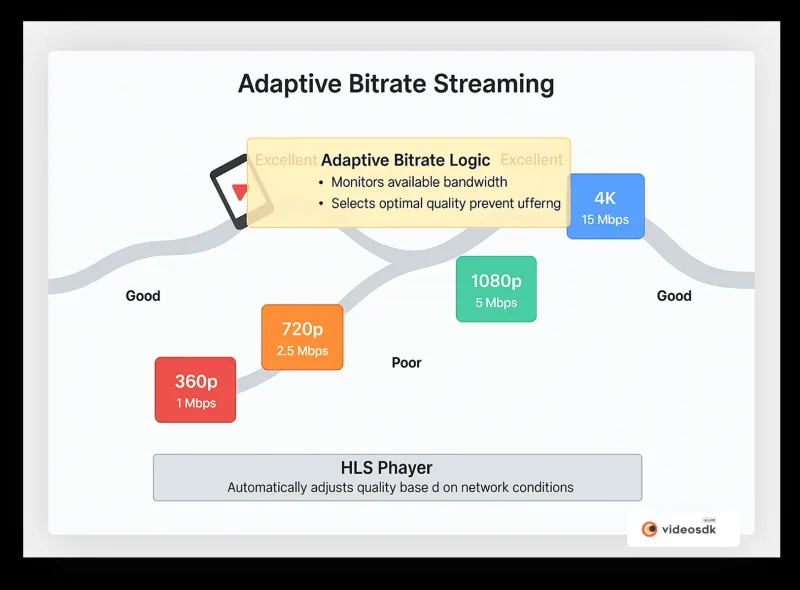
Photo: video streaming quality adaptive bitrate technology network, via strapi.videosdk.live
Adaptive bitrate streaming is one of those technologies that sounds like it just works. You configure a few quality tiers, your player switches between them automatically based on network conditions, and viewers get the best experience their connection can support. Simple, right?
Except it's really not. A misconfigured ABR ladder can actively hurt your stream quality in ways that are subtle enough to miss during internal testing but obvious to a viewer on a congested mobile network in rural Ohio trying to watch your content on a three-year-old Android phone. Bad ladders cause unnecessary buffering, jarring quality shifts, wasted encode cycles, and viewer drop-off that shows up as an unexplained engagement problem in your analytics.
Let's get into the specific ways ABR ladders go wrong — and how to build one that actually does what it promises.
Mistake #1: Too Many Rungs on the Ladder
More options feel like more safety. If you have 10 quality tiers instead of 5, surely the player can make better decisions, right? In practice, the opposite is often true.
ABR players make switching decisions based on bandwidth estimates, buffer depth, and segment download times. When you pack too many tiers close together — say, 1500 Kbps, 1800 Kbps, 2100 Kbps, and 2400 Kbps all within the same general quality range — the player thrashes. It switches up, network conditions dip slightly, it switches back down, conditions recover, it switches up again. That constant oscillation is perceptible to viewers as flickering quality changes, and it taxes the player's decode pipeline unnecessarily.
A well-designed ladder typically needs 4 to 6 tiers with meaningful separation between each rung — usually a 50–75% bitrate increase from one tier to the next. That gap gives the player room to make stable decisions and reduces the frequency of switches.
For a standard 1080p ladder targeting broad device compatibility, a reasonable starting structure looks like:
- 360p at 400 Kbps
- 480p at 800 Kbps
- 720p at 1.5 Mbps
- 1080p at 3–4 Mbps
Clean, distinct, and easy for any ABR algorithm to navigate.
Mistake #2: Mismatched Resolution and Bitrate
This one causes more viewer complaints than almost anything else, and it's surprisingly common in setups that were configured quickly or copied from a template.
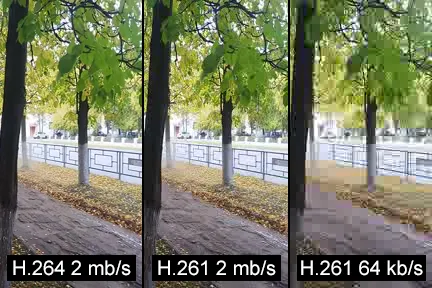
The problem: encoding a high resolution at an insufficient bitrate doesn't give you a great-looking lower-bitrate stream. It gives you a blurry, blocky mess that looks worse than a lower resolution encoded correctly. A 1080p rendition at 800 Kbps will look significantly worse than a clean 480p rendition at 800 Kbps — the encoder is trying to fill four times the pixels with the same data budget, and the compression artifacts become very visible.
Yet plenty of ladders in the wild have exactly this problem, often because someone added a "1080p option" without adjusting the bitrate to actually support it.
The fix: Match your resolution to a bitrate that can actually render it cleanly. A common rule of thumb for H.264 at 30fps:
- 360p: 400–700 Kbps
- 480p: 700 Kbps–1.2 Mbps
- 720p: 1.5–3 Mbps
- 1080p: 3–6 Mbps
If your CDN or origin costs require you to cap bandwidth, drop the resolution to match the bitrate rather than delivering an overcompressed high-res rendition.
Mistake #3: Skipping the Mobile Network Test
This is where real-world failure modes hide. Most streaming teams test their ladders on office wifi or home broadband, declare victory, and ship. Then the support tickets come in from viewers watching on LTE in a crowded stadium or on a spotty hotel connection.
Mobile networks are not just slower broadband — they behave differently. Bandwidth can swing from 8 Mbps to 400 Kbps in seconds. Latency spikes unpredictably. The ABR player's bandwidth estimator, which was calibrated on stable connections, can lag behind these rapid changes and either buffer or stick stubbornly to a high tier that the connection can no longer support.
Practical fix: Use network throttling tools during QA. Chrome DevTools has built-in throttling presets. For more realistic simulation, tools like Charles Proxy or dedicated network emulation hardware let you replicate specific mobile network profiles. Test every tier transition under throttled conditions, not just playback at a steady bitrate.
Also check your minimum tier. If your lowest rendition is 720p at 1.5 Mbps and a viewer's connection drops to 600 Kbps, the player has nowhere to go. Include a genuine low-bandwidth floor — something in the 300–500 Kbps range — even if it looks rough. A watchable low-quality stream beats an unwatchable buffer spinner every time.
Mistake #4: Ignoring Segment Duration
ABR switching happens at segment boundaries. If your segments are 10 seconds long, the player can only make a quality decision every 10 seconds. On a mobile network where conditions change every 2–3 seconds, that's a recipe for extended buffering while the player waits for the current segment to complete before it can switch down.
Shorter segments — typically 2–4 seconds for live streaming — give the player more frequent decision points and improve responsiveness to network changes. The trade-off is slightly higher HTTP request overhead, but on modern infrastructure that's rarely a significant concern.
For VOD, segments of 4–6 seconds are generally a reasonable balance between adaptability and request efficiency.
Mistake #5: Never Revisiting the Ladder After Launch
ABR ladder configuration isn't a one-time task. Viewer device profiles change. Your content mix evolves. New encoding presets become available. A ladder that was well-tuned for a desktop-heavy audience in 2021 may be poorly optimized for a mobile-first audience in 2025.
Set a quarterly reminder to review:
- Your audience's device and connection breakdown (from your analytics platform)
- Segment download time distributions (a sign that tiers are too high for your actual audience)
- Buffer ratio by rendition (which tier is causing the most rebuffering?)
- Encode cost per tier vs. actual play time at that tier
That last one is worth emphasizing. If you're spending compute resources encoding a 4K tier that 2% of your viewers ever reach, that's a cost optimization opportunity sitting right there in your metrics.
A Quick Framework for Building a Better Ladder
If you're starting fresh or auditing an existing setup, here's a practical sequence:
- Anchor on your content type. Live sports needs different treatment than on-demand tutorials. High-motion content needs more bits per pixel than talking-head video.
- Define your floor and ceiling. What's the minimum acceptable quality? What's the highest resolution your audience actually watches at? Don't encode above what your analytics show viewers consuming.
- Space your tiers with intention. Aim for ~50–70% bitrate increase between rungs. Avoid clustering tiers close together.
- Validate resolution-to-bitrate ratios against reference quality metrics (VMAF or SSIM scores are your friends here).
- Test under real network conditions — not just your office wifi.
- Monitor after launch and treat the ladder as a living configuration, not a set-it-and-forget-it decision.
A well-built ABR ladder is invisible to viewers in the best possible way — they just watch, the quality adjusts quietly in the background, and nobody thinks about it. That's the goal. Getting there requires more intentionality than most teams apply, but the viewer experience payoff — and the reduction in support headaches — is absolutely worth the effort.