One Encode to Rule Them All? The Multi-Platform Video Trap That's Quietly Hurting Your Numbers

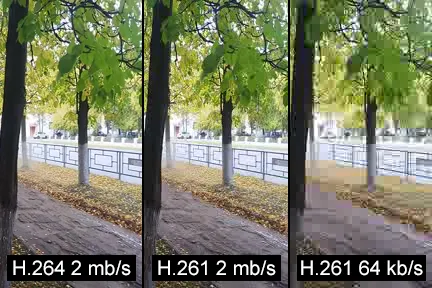
Photo: Wilfredor, CC0, via Wikimedia Commons
Every creator and media team eventually lands on the same dream: encode once, distribute everywhere. One job, one output, done. Upload to YouTube, cross-post to TikTok, share to Instagram, call it a day.
It's an appealing fantasy. It's also quietly wrecking performance for a lot of people who don't realize it.
The problem isn't laziness or bad intentions — it's that TikTok, YouTube, and Instagram are genuinely different platforms with genuinely different technical requirements. Treating them like interchangeable buckets for your video file creates a cascade of small compromises that add up to real engagement losses. Let's dig into what's actually going on.
The Codec Situation Is More Complicated Than You Think
YouTube accepts H.264, H.265, VP9, and AV1. It actually prefers AV1 for uploads these days and will re-encode your content on its end regardless — but uploading in a format it likes reduces the likelihood of transcoding artifacts and processing delays.
TikTok is predominantly an H.264 platform. It re-encodes everything you give it, but the quality of that re-encode is heavily influenced by what you hand off. Hand it a poorly compressed H.265 file and TikTok's re-encoder will make decisions that soften fine detail and introduce banding in gradients — exactly the kind of visual noise that reads as "low quality" on a small phone screen.
Instagram is somewhere in the middle, accepting H.264 broadly and handling H.265 with varying results depending on whether you're posting a Reel, a Story, or a standard feed video. Yes, those are treated differently by Instagram's backend. No, most people don't know that.
The upshot: a single codec choice is already a compromise before you've even thought about resolution.
Aspect Ratios Are Not a Minor Detail
This is where the single-encode dream really starts to fall apart.
YouTube's native format is 16:9 widescreen. That's baked into the player, the recommendation algorithm thumbnails, the whole experience. Upload a 9:16 vertical video to YouTube and it gets letterboxed with black bars, which looks fine on mobile but slightly awkward on desktop — and more importantly, it signals to YouTube's systems that this content isn't optimized for the platform.
TikTok and Instagram Reels are 9:16 vertical, full stop. If you're uploading 16:9 widescreen content to either platform, they'll either crop it (cutting off content you didn't intend to cut) or display it with horizontal black bars that eat into the visual real estate of an already small screen.
Instagram feed posts add another wrinkle: the optimal ratio there is 4:5 portrait, not 9:16. If you're posting the same file to Reels and feed posts, you're already making a compromise on one of them.
You can't solve this with a single output file. You need different crops, and those crops need to be intentional — not auto-generated by a platform's algorithm that doesn't know where your subject is in the frame.
Metadata and Container Choices Matter More Than You'd Expect
Here's a less obvious one: metadata compatibility.
YouTube reads and processes a rich set of metadata — chapter markers, closed captions embedded in the file, color space information (HDR, wide color gamut), and more. Getting this right improves accessibility, enables features like auto-chapters, and can affect how the platform categorizes and recommends your content.
TikTok largely ignores most of that metadata. It doesn't support embedded chapter markers in any meaningful way, and its HDR handling is inconsistent enough that uploading HDR content often produces worse results than a well-graded SDR file.
Instagram has its own metadata quirks, particularly around color profiles. Upload a file with a wide color gamut profile that Instagram doesn't recognize and you'll get a color shift on the platform that makes your carefully graded footage look washed out or oversaturated. It's a small thing that has a big visual impact.
A single output file can only carry one set of metadata. Pick YouTube's preferences and you may be sending TikTok something it doesn't know what to do with.
So When Does Single-Pass Encoding Actually Make Sense?
Here's where we try to be fair, because single-pass multi-platform encoding isn't always wrong. There are scenarios where it's a perfectly reasonable call.
When you're producing talking-head content with a static background — podcasts, interviews, commentary — the visual complexity is low enough that platform re-encoding does less damage. The platforms' transcoders handle simple, low-motion content pretty well. A single well-compressed H.264 output at 1080p will survive the journey to most platforms in decent shape.
When your content is already 9:16 and you're targeting TikTok and Reels primarily — you can often use a single vertical output and just accept the YouTube letterboxing as a tradeoff, especially if YouTube isn't your primary distribution channel.
When you're operating at high volume with limited resources — if you're publishing 20 videos a week, the ROI on fully optimized per-platform encodes may not pencil out. In that case, a good single-pass encode with careful format choices (H.264, 9:16, clean metadata) gets you 80% of the way there at a fraction of the cost.
The Framework for Deciding
Before you commit to a workflow, ask yourself three questions:
-
Is this content visually complex? High motion, fast cuts, detailed textures, and HDR all suffer more from re-encoding. Complex content warrants platform-specific outputs.
-
Which platform drives the most value for this specific piece of content? Optimize hard for that one. Let the others be secondary outputs with reasonable-but-not-perfect settings.
-
What's the cost of underperformance? For a brand campaign with real media spend behind it, the cost of bad encoding is high. For organic content on a growing channel, the calculus is different.
The honest answer is that most professional content — anything where quality and performance actually matter — benefits from platform-specific outputs. The savings from skipping that step are usually smaller than the engagement losses from delivering suboptimal video to each platform's re-encoder.
The Actual Workflow That Works
A practical middle ground: encode a high-quality mezzanine file (think ProRes or a high-bitrate H.264 master) and use that as the source for platform-specific outputs. Tools like FFmpeg, Handbrake, or cloud encoding services like Bitmovin and Coconut.co let you define multiple output profiles from a single source. You're not re-encoding from scratch for each platform — you're running multiple targeted encodes from the same clean master.
Yes, it's more work than one-and-done. But it's less work than trying to figure out why your TikTok videos look soft, your YouTube engagement is down, and your Instagram Reels are getting color-shifted — all because you handed every platform the same file and hoped for the best.